Scanning and digital workflows streamline Making Tax Digital (MTD)
End to end digital workflow eases ‘Making Tax Digital’ (MTD). Document Logistix’ Document Manager captures and stores electronic records such as email and digital documents.
Document Logistix also has a scanning bureau to help companies to bulk scan paper archives to be more efficient.
As a partner of Ricoh we also offer Ricoh’s ScanSnap range of scanners as an in-house solution to help businesses to streamline their document flow from receipt to deletion.
What is ‘Make Tax Digital?
Making Tax Digital (MTD) is a UK government initiative aimed at modernising the tax system by requiring businesses and individuals to keep digital records and submit tax returns using compatible software.
MTD is managed by HM Revenue & Customs (HMRC) and is part of the broader effort to make tax administration more efficient, reduce errors and simplify the process for taxpayers.
Key Points About MTD
- Digital Record-Keeping – Businesses must keep digital records of their financial transactions.
- Compatible Software – Tax returns must be submitted using HMRC-approved software.
- Phased Implementation – MTD is being introduced gradually, with different deadlines for various taxpayer groups.
Ready for MTD?
A significant number of businesses were not fully prepared for HMRC’s ‘Making Tax Digital’ (MTD). Approximately 4,000 small businesses missed their first quarterly VAT return deadline. By adopting a digital document strategy – or helping your customers to set up a digital system – all reporting and filing will become that much simpler. Ricoh scanners offer a solution for all business types to help digitise tax and meet deadlines promptly and efficiently.
Moving to a digital platform brings many benefits. Users can view their tax status – and any work-flowed data – in real-time.
Audits are simple to fulfil
A significant advantage of an MTD-friendly digital platform is centralised storage, which makes permission-based access easy and secure from any location. A digital system means that there is a complete record of access and actions so audits are quick and easy to complete and verify.
Setting up a system
Having a document scanner that digitises and organises data in the shortest and easiest way possible makes a huge difference to everyday processes.
As an example, Ricoh’s ScanSnap Cloud is a wide-ranging system which, when paired with the ScanSnap iX1500 and iX100, scans documents directly to the cloud. As these models connect directly via ScanSnap cloud to preferred cloud systems, there is no need for any additional devices. ScanSnap Cloud assigns data to the correct cloud space. The software processes and routes all documents automatically.
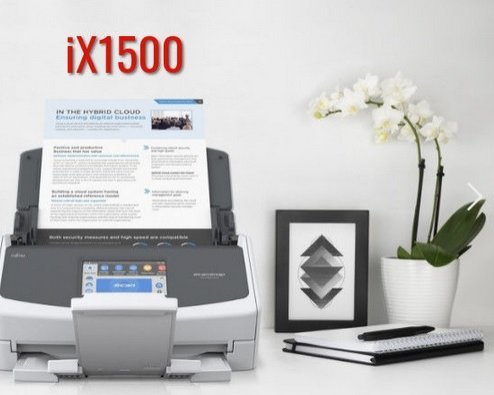
The benefits of implementing the use of a document scanner and scanning to cloud systems, smart devices or a computer into everyday practices don’t end with just digitising tax.
Save space and money
By digitising records and filing, you eliminate the need for paper-based filing systems, which frees up office space.
Increased productivity
Employees no longer have to hunt for a paper document; digitised data is only a few clicks away.
Environmentally friendly
Many companies now have Green policies. A quick estimate will help you to appreciate the positive impact of a paperless process. Less paper is wasted, document transportation is minimised, and contribution to landfill is reduced.
Risk management
In the unfortunate event of a disaster, digital data offers a reliable back-up compared to paper documents.
Compliance
Digital document management maintains the security, integrity and accessibility of data, facilitates audit trails and automates retention periods. You may like to speak to one of GDPR experts on how to build compliance into your digital business processes.
Find out more about Ricoh scanners, data capture and automated document workflows. Book a Call.
🔍 More About Making Tax Digital?
Making Tax Digital is being rolled out in stages:
MTD for VAT (Live)
Applies to VAT-registered businesses with a taxable turnover above the VAT threshold (£90,000 as of April 2024).
These businesses must keep digital records and use MTD-compatible software to submit VAT returns.MTD for Income Tax Self Assessment (MTD for ITSA)
Starts April 2026 for sole traders and landlords with income over £50,000, and from April 2027 for those earning over £30,000. You’ll need to keep digital records and submit quarterly updates of income and expenses.MTD for Corporation Tax
No confirmed start date yet; still in consultation phase.
✅ How to Comply with MTD
Use MTD-Compatible Software
Choose software that’s officially recognized by HMRC: HMRC’s list of compatible software.
Keep Digital Records
You must keep digital records of all income and expenses.
You can use spreadsheets if they are combined with “bridging software” to submit returns digitally.
Sign Up for MTD with HMRC
You need to actively sign up for MTD through your HMRC online account before the first mandated return under MTD rules.
Submit Updates Quarterly (for ITSA)
Instead of just one annual Self Assessment tax return, you’ll submit four updates a year and a final declaration.
⚙️ Best Practices for Smooth Compliance
Automate Where You Can
Use features like bank feeds and receipt scanning to make digital record-keeping easier.Work With an Accountant
Many accountants offer MTD compliance packages — very helpful for small businesses or landlords.Stay on Top of Deadlines
MTD introduces more frequent reporting, so be aware of your update periods and deadlines.Train Your Team
If you have staff managing books, make sure they know how to use the new systems.