Dynamic Workflow Designer
Document Logistix’s graphical dynamic workflow design tool makes it incredibly simple for anyone to plan, design, review and implement a new workflow. Even to roll back if you want to revert to a previous workflow version.
Dynamic workflow design eliminates the high cost of workflow programming.
You can simply drag and drop workflow milestones, and label them to suit your workflow, for example, ‘Pre Approval’, ‘Approved’ and ‘Filed’, or ‘Ordered’, ‘Checked’, ‘Despatched’.
Assign any number of labelled workflow checkpoints with sub tasks for people according to their role or responsibility. Rules prevent work passing to the next stage until each checkpoint requirement is met.
Assign Workflow Alerts
You can assign alerts and email messages to flag issues or ask for comments. There’s a full audit trail at the end of a workflow process.
If there’s an exception, say in an accounting process, the records can be reviewed to explain why a particular order was credited or discounted, say, because of a part shipment, and who authorised it.
Workflow Designer can be used to create workflows for any business function; a manufacturing process; an HR process from recruitment to on-boarding, training and performance reviews; warehousing and distribution; professional services or retail business processes.
Drag and drop your chosen checkpoints, assign roles, actions and responsibilities, and watch your timeline and workflow materialise on your monitor. Share with colleagues for comments.
For the first time, teams can capture the views of everyone involved in a process to ensure that there are no bottlenecks in the workflow.
When everyone’s happy with the new workflow, simply publish and implement it at the click of a mouse.
If for any reason you need to rollback to a previous workflow version, it’s an easy option.
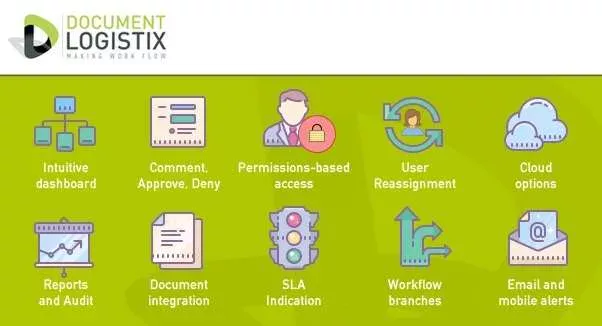
Dynamic Workflow Designer creates new business process review opportunities
For the first time ever new sofware makes it possible to involve your team in a workflow review, agree checkpoints and associated actions, build and implement the agreed automated workflow, and simply drag it ‘live’. Dynamic WorkFlow Designer gives you entirely new opportunities to keep workflows under review and chaneg them on the fly.
Workflow changes are very simple
How often do you have the opportunity validate business process changes to ensure your business is running effectively and efficiently?
It has been historically difficult to review and plan potential workflow and process changes with colleagues. It has been even harder to program them and implement changes.
To remain efficient, and to make processes comfortable for staff and profitable for the business, it is beneficial to review processes regularly.
With our new graphical dynamic workflow design tools, it is possible for anyone – with no need for programming skills – to design a workflow or business process simply by dragging, dropping and labelling workflow checkpoints.
Tasks, responsibilities and deadlines can be assigned to any stage in the process. Control measures such as reminders, automated alerts and budget thresholds can be set up to ensure that processes stay on track and within permissions.
Documents at each workflow checkpoint
Workflow works perfectly in combination with electronic document management (EDM). At each workflow checkpoint, relevant digital information or specific documents, can be reviewed, commented upon or approved so that tasks are completed in sequence, from project initiation to secure archiving.
The advantage that dynamic workflow design software provides is that workflow drafts can be made and circulated and shared to capture the knowledge and input of anyone involved in the process, from senior management to the ‘shop floor.’
Workflow design collaboration helps to create truly effective workflows and has the additional bonus of staff inclusion that generates buy-in to process changes.
Visualise, Design and Implement Document-Centric Workflows
Drag and Drop your new workflow to implement automated processes, from simple Purchasing or Purchase Order workflows, to complex supply chain workflows.
Read more about Document-Centric Workflow Automation
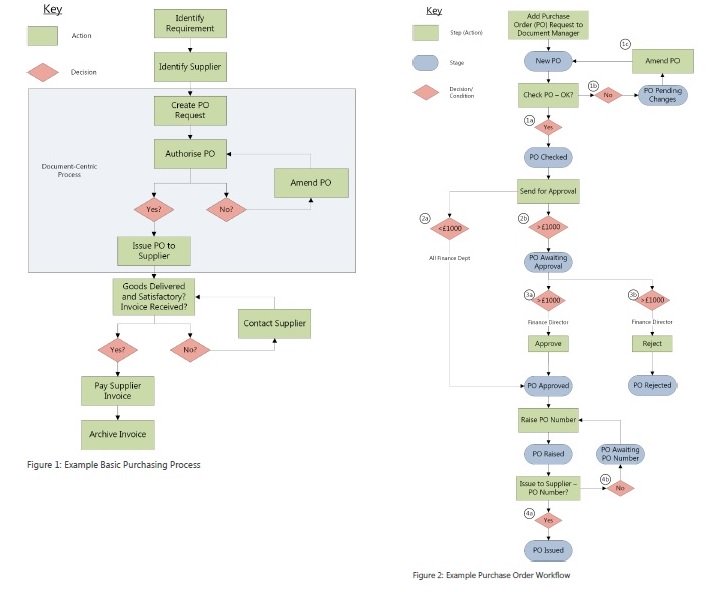
Design and implement document-centric workflows
Visualise, design and implement workflows for any process, from Purchasing or Purchase Orders to complex supply chain workflows.
Do I need programming skills for Dynamic Workflow Designer?
With new tools, workflow review can be as informal, ad hoc, or continuous as you like. However, you are no longer restricted by a lack of technical or programming expertise, and process suggestions and changes can be captured, communicated and implemented quickly.
Workflow software is process agnostic and can be used to design workflows that are business-wide or that are department-specific for Accounts, Human Resources, Client Services, Manufacturing, Asset Management, and more.
The implementation of the right automated workflow for your business improves decision making, eliminates time wasted on searching for information, reduces doubt and human error.
Staff can follow a pre-set set of procedures and devote more time to customers and high-level tasks.
A new world in workflow review and implementation
Users of workflow design software, have commented very positively on the new flexibility and immediacy it brings to their business.
They like the fact that they don’t have to wait months, during which they have to tolerate a poor procedure, in order to make some agile changes to their business processes.
Workflow review becomes virtually continuous, and it becomes second nature to give attention to how a company can improve products and processes, as well as staff and customer satisfaction.
Instant workflow implementation and roll back
The remarkable benefit of Dynamic Workflow Designer is that, once agreed, a new workflow can be implemented, rolled-out and put into practice at the click of a mouse.
What used to require many days or weeks of expert programming, testing and training, can be achieved within a very short space of time. What’s more, if there is an unforeseen issue, the workflow can be rolled back to a previous workflow version just as simply.
Dynamic workflow software means that whenever you encounter something that you would rather not have happen again, you can try to work out a way to prevent it. Whenever something goes especially well, you can analyse what it is and replicate it in the future.
Soft benefits of workflow updates
Dynamic workflow design not only improves business processes, but also generates less tangible, people benefits:
- Staff become more open minded about the process in which they are involved.
- People become more accepting of change because they can see and contribute to the objectives.
- While it will always be senior management’s role to make the final decision, progressive managers have gained the benefit of input from all staff, from remote field workers to hands-on operatives.
- Workflows come to be seen as everyone’s work process, rather than an imposed process. Though expertise is taken into account, knowledge transfer is equally important.
Read more about Business Process Management Software