Document Management for Accounts Departments; Accounts Payable Workflow Software
Create, capture, index, distribute, store and retrieve the entire range of an Account department’s documents digitally with Accounts Departments document management software.
If you are searching for these solutions, you’ve landed in the right place:
- Invoice document search system
- Accounting document management system
- AP automation software
- Invoice processing workflow automation
- OCR invoice capture software
Document management systems (DMS) help accounting departments streamline and optimise accounting processes, by eliminating paper-based processes to improve accuracy and reduce manual tasks. Manage all document types including correspondence, emails, invoices, purchase orders, proof of delivery, transactions, audit records and financial statements.
Document Manager enables you to ingest data accurately as it enters your business, by OCR scanning or AI data capture, then indexing, organising documents and storing them securely in a central location. Accounting tasks are assigned to designated staff that are clearly visible in a user-friendly interface.
Digital document management helps Accounts Payable staff and Accounts Departments to work more efficiently. Simplify tasks and complete accounts faster with the ideal accounting software for small businesses and enterprises. It’s your choice to work with our on-premises accounting system or take advantage of our cloud-based accounting software.
See Award-winning Robotic Process Automation AP Document Management Software in Action >>>

What is Accounts Payable Document Management Software?
Accounts Payable document management establishes the groundwork for accurate financial auditing and financial reporting. Document Manager facilitates a paperless, compliance-focused AP process.
Accounts Payable departments face a continuous onslaught of invoices and related documents that arrive from multiple locations and in multiple formats. Capturing and organising complex data is a constant challenge in accounting, but Document Manager enables you to enhance business processes that are frequently inefficient and error-prone.
Invoice processing, invoice entry, document routing for approvals, records management, syncing with existing systems, and even audit trails can all be automated. AP automation solutions also simplify remote access for approvals and payments while helping to limit unauthorised access through different granular access permissions.”
Document Manager in Accounts Departments
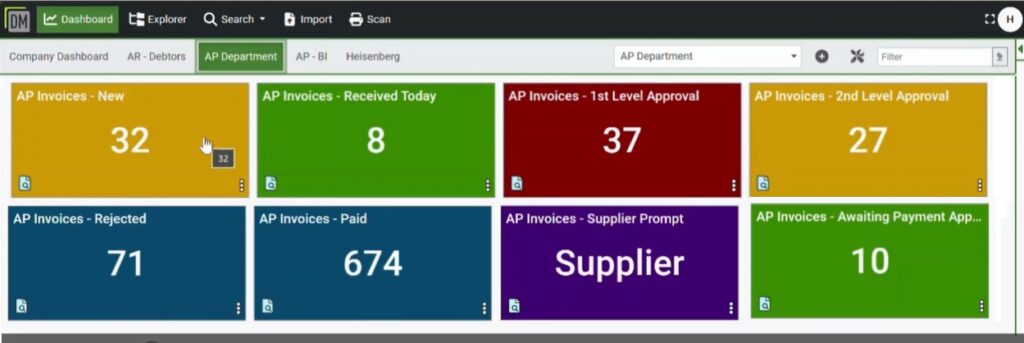
Enjoy an intuitive user dashboard view and line-of -sight across the status of tasks and all critical workflow activities.
Document Logistix’ Document Manager provides comprehensive accounting functions yet is simple for the user to operate and effective for Department Heads, Finance Controllers, Financial Directors and CFOs who require up-to-date, accurate reporting.
In many companies the back office and business admin is moving closer to the front office.
While efficient accounts processing has always been important to the financial wellbeing of an organisation, today speed and accuracy are frequently required for real-time collaboration with with customer-facing departments and support efforts to improve operations and customer service.
Accounting Trends in 2026
Frequently Asked Questions
What is accounts payable document management software?
Accounts Payable document management software is a digital solution that captures, stores and organises financial documents such as invoices, purchase orders and receipts. It enables accounts teams to search, retrieve and manage documents instantly and reduce reliance on paper-based processes and manual filing.
How does invoice document search work?
Invoice document search uses indexing and OCR (optical character recognition) to make invoice data searchable. Users can quickly find documents by:
- Supplier name
- Invoice number
- Date or amount
- Purchase order reference
This enables fast invoice retrieval and eliminates time spent manually searching through files.
How does OCR improve invoice processing?
OCR (optical character recognition) automatically extracts data from invoices and converts it into searchable digital text. This allows accounts departments to:
- Reduce manual data entry
- Improve accuracy
- Speed up invoice processing
- Enable instant document search
OCR is essential for building a fully searchable accounts payable document management system.
Can I quickly retrieve invoices for audits?
Yes. A document management system creates a central, searchable repository of financial records to make it easy to retrieve invoices and supporting documents in seconds. This is especially valuable during audits when fast access to accurate records improves compliance and reduces stress.
What are the benefits of automating accounts payable workflows?
Automating accounts payable workflows helps organisations:
- Speed up invoice approvals
- Reduce processing errors
- Improve visibility of outstanding invoices
- Ensure consistent approval processes
- Maintain a clear audit trail
This leads to more efficient operations and better financial control.
How does document management reduce errors in accounting?
By automating data capture and standardising workflows, document management software reduces the risk of:
- Duplicate payments
- Lost invoices
- Incorrect data entry
Built-in validation and tracking features help maintain accurate and reliable financial records.
Is cloud-based document management secure for financial data?
Yes. Modern cloud-based systems use advanced security measures such as encryption, access controls and audit logs to protect sensitive financial information. This ensures that only authorised users can access documents while maintaining full traceability.
Can document management software integrate with accounting systems?
Yes, accounts payable document management solutions such as Document Manager integrate with popular accounting and ERP systems. This allows invoice data and documents to flow seamlessly between systems to improve efficiency and reduce duplication of work.
How does document management support paperless accounting?
Document management software enables organisations to digitise and store all financial documents electronically. This reduces paper usage, lowers storage costs and enables teams to search and access documents from anywhere, which supports a fully paperless accounts department.
Managing Invoices with Document Manager
Accelerating payment processes
Effective invoice management is crucial for maintaining healthy cash flow, preventing late fees and fostering strong vendor relationships.
Effective digital invoice management boosts productivity, reduces errors and improves financial transparency.
Online accounting software enables you to send invoices and receive workflow alerts and invoice reminders. It also simplifies VAT management and VAT submissions, and keeps a detailed record of all VAT returns.
Document Manager can link to your business bank to facilitate compliance with Making Tax Digital and tax digital rules. Track invoices and accept payments in one safe location to save time and stay productive.
Digital invoice management coupled with automated accounting workflows are essential to optimise business operations.
Document Manager is a flexible system that enables AP users to optimise their workflows, from receiving an invoice, through approval and payment processes, to archiving and automated records retention and data purging in order to comply with the regulations of your industry sector.

Case Study 1: Streamline Your Accounts Department with Document Management
Background
A mid-size Accounting Firm specialising in financial audits, tax preparation and bookkeeping for small to medium-sized enterprises looked for an accounting document management solution. The accounting firm had been experiencing inefficiencies in managing client documents which lead to delays in service delivery and raised compliance risks.
Challenges
Paper-Based Document Storage
The firm relied on physical files which made document retrieval time-consuming and inefficient.Data Security Concerns
Sensitive financial data was at risk owing to limited access control and scatter-gun storage.Regulatory Compliance Issues
The firm struggled to monitor and adhere to document retention policies and could not readily produce accurate audit trails.Collaboration Difficulties
Accountants and auditors faced challenges in sharing and editing documents efficiently.
Accounting Document Management System Implemented
The Accounting Firm adopted a cloud-based Document Management System (DMS) with the following features:
Centralised Digital Repository
All financial documents were digitised and stored in a secure cloud-based platform.Access Control and Encryption
Role-based permissions ensured that only authorised personnel could access sensitive information, while encryption prevented mischief and hacking.Automated Retention Policies
The system enforced compliance with industry regulations by automatically retaining, archiving and deleting records.Collaboration Tools
Real-time editing, secure document sharing and tracking of financial documents improved efficiency.
Results and Benefits
Time Savings
Document retrieval time reduced by 70% owing to an efficient search and indexing system.Enhanced Security
Encryption and access controls ensured data confidentiality across business processes.Regulatory Compliance
The firm met audit and compliance standards which significantly reduced the risk of business disruption and potential penalties.Improved Client Satisfaction
Accurate document organisation and faster document processing led to quicker service delivery and enhanced client relationships.
Accounting Document Management Software: Conclusion
By implementing a robust Document Management System, the Accounting Firm transformed its document handling process which enhanced efficiency, security and compliance.
Electronic invoicing eliminated duplicate invoice errors and, together with an enhanced approvals process generated measurable cost savings.
The shift to digital document solutions significantly improved operational workflows and set a new standard for document management in accounting.
Document Manager AP Workflow
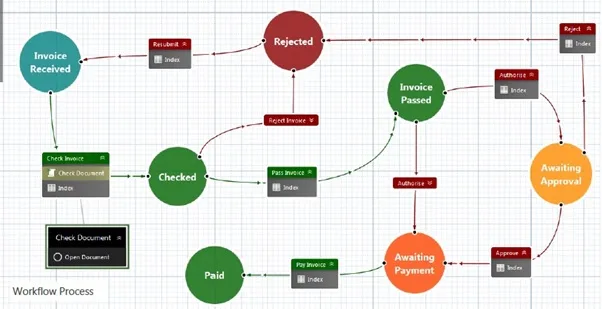
The use of Document Manager’s Accounts Payable workflow ensures that only accurate, checked and approved data is ever posted to your ERP.
Using Invoice Approval workflows, Document Manager automatically matches against your purchase orders. Apply your business rules and manage the process of exceptions handling.
Fully compliant, and with a document level audit log, Document Manager has the power to remove all manual tasks from your AP process.
Document Manager: Automation for Accounts Payable
Legacy accounting systems are not as simple to use or as feature-rich as Document Manager. Centralise data, minimise manual work, and pre-configure search and retrieve functions that are faster and more accurate than in native applications.
- Capture data from incoming invoices automatically.
- Automate workflows, approvals and internal controls.
- Digitise to reduce data entry and repetitive tasks to minimise human error.
- Centralise data for accounting efficiency and real-time collaboration.
- Each user has a personalised user interface with dashboard with relevant saved searches and visual task status indicators. Workflow tasks are supported by automated reminders.
- Comprehensive, real-time reporting for management and auditors.
- Digitised processes replicate manual processes, which minimises change management.
- Reduce time and costs by up to 80% and increase the value of your team’s work.
Effective Data Entry at the Start of the AP Process
Ingesting data quickly and accurately ensures that each successive step of the accounts process is simple to manage. Document Manager provides you with multiple ways to ingest documents and data.
Watched folders can be employed to receive emails, strip attachments and OCR capture data at header or line level.
Document Manager automatically checks your supplier register to ensure the invoice is yours and also checks to ensure the invoice is not a duplicate.
Once the originator is checked, Document Manager matches the invoice values to your open POs and applies any business rules and routines that you have.
Invoice data that directly match can be passed directly to the ERP for payment, which makes your AP management one of exception handling only.
Document Manager’s workflow engine ensures that invoices are always seen and approved by the correct person in your organisation. Automated AP approval workflows are especially important for companies without an embedded PO routine.
Technical Features of Digital Document Management in Accounting
- Optical Character Recognition (OCR)
OCR technology converts scanned documents and images into machine-readable text, which facilitates automated data entry and searchability. Scanning eliminates manual data input errors, enhances efficiency and allows for quick retrieval of accounting records. - AI-Powered Data Extraction
Our AI-driven system intelligently recognises and categorises financial data from documents, including invoices, receipts and statements. Document Manager automates line-item matching, flags discrepancies and ensures compliance with accounting standards, which reduces human intervention. - Cloud Accessibility
Cloud-based document management ensures secure, real-time access to accounting records from anywhere. Cloud accessibility supports collaboration within the Accounts team and provides scalable storage with automated backups for data security.
If you want to digitise archived and legacy paper documents to complete your digital transformation, we can accomplish this for you in our in-house scanning bureau, where we scan millions of records a year and auto-index them in Document Manager.
Reduce Accounting Processes Costs
Implementing digital document management in an accounts department significantly reduces costs by improving efficiency, saving time and cutting expenses.
Automation minimises manual data entry and processing time. Document retrieval times drop drastically as digital files replace paper-based systems. Storage costs decrease as physical filing is eliminated. Compliance and audit processes become faster and more accurate, which reduces administrative overhead.
Overall, businesses typically see cost reductions in labour, printing storage, and retrieval and save 30-50% in operational expenses.
Faster processing also ensures better cash flow management, which enables companies to optimise working capital and take advantage of early payment discounts.
How Accounts Payable Automation Software Helps Your Business
Accounting workflow automation software provides a fast, reliable, paperless and simple way to organise your files and file-related processes in Accounts Payable.
The traditional accounts payable process is often time-consuming and error-prone, involving manual data entry, paper invoices, and a series of approval steps that can create bottlenecks. AP automation streamlines these processes by digitising and automating invoice capture.
When applied to Accounts Payable departments, workflow automation is a key component of keeping your AP documents visible, organised and optimally accessible.
All documents are securely stored in a central repository that is accessible to authorised users on desktop and via mobile devices.
Accounts Payable document management automation helps you to:
Streamline supplier payment processes
- Pre-configure and embed processing protocols to ensure document security and accounting workflows that follow company policies and GDPR compliance measures.
End-to-end payee management
- Provide an end-to-end system for payee on-boarding, tax form collection, invoice collection and approvals, payment method and currency selection. AP teams have easy access to uploaded documents, can securely share documents and manage the entire document lifecycle error-free.
Enhanced communication
- Streamline communication and coordination between relevant employees and vendors. Create staff and client portals to upload and process internal and external client documents.
Instantly Search and Retrieve Financial Documents
Invoice search systems enhanced by optical character recognition (OCR) and indexing technologies streamline document management by converting scanned invoices into searchable data.
OCR extracts key information from paper or digital files, while indexing organises this data for efficient storage.
Together, these tools enable fast retrieval of invoices and reduce manual effort, which improves accuracy and accelerates business workflows.

Robotic Process Automation
Robotic Process Automation (RPA) is quietly revolutionising Accounts Payable departments across.
By taking over repetitive, time-consuming tasks like data entry, purchase orders, invoice validation, payment and invoice processing, and bank statement cross referencing, RPA enables finance teams to work smarter, not harder.
RPA reduces errors, speeds up approvals and ensures suppliers are paid on time – all while freeing people to focus on analysis and relationship-building.
The result is a more efficient, accurate, responsive and future proof finance function. Instead of drowning in paperwork, teams can concentrate on adding real value to the business. In short, RPA brings calm, clarity and consistency to Accounts Payable processes and finance operations.
Artificial intelligence and machine learning take RPA even further by enabling the system to learn from data patterns, predicting errors before they happen, and continuously improving financial processes. Together, they make AP automation smarter, more adaptable and capable of handling complex, human-like decision-making with remarkable precision.
The Benefits of Streamlined Accounting Processes
Document Manager provides a more efficient system for managing transaction-related paper and digital documents. All tasks and workflows are visible in a customisable user dashboard.
Key accounting process benefits include:
High volume, low effort document data capture
Whether using our OCR scanning front end or our AI-based data capture, accounts documents are indexed and routed accurately the moment they enter your business. You can handle multiple paper and digital document types and sizes effortlessly.
User definable indexing and folder set-up
Fully automated indexing powered by AI, with invoices cross-referenced with GRN, PO and relevant details. Subsequent workflow automation with embedded company protocols standardises your accounting processes.
Seamless systems integration
Document Manager integrates with your core finance, ERP, HR, logistics, procurement and other back office solutions. The result is secure centralised documents. Document Manager provides automatic data backup, automates version control, eliminates duplication of effort, and affords you multiple efficiency benefits such as the ability to identify data collection gaps and missing documents.
Once you have a digitised accounting process in place, extended benefits include an improved ability to meet strategic goals and customer SLAs, together with modular options to add a business intelligence dashboard for real-time data visualisation.
Among the most valued benefits of accounting digitisation are Document Manager’s built-in regulatory and GDPR compliance measures, which include encryption, access controls and complete, accurate audit trails.
Automate and Manage Documents in the Context of Your Accounting Workflows
Share, save and organise files securely with Document Manager which is designed with the needs of accounting professionals in mind.
Upload and download files individually or in bulk, and keep everything connected to the appropriate work item and contact.
As explained in our Invoice Automation Guide, invoice routing and workflow optimisation streamline financial processes to reduce manual errors and delays.
Invoice automation captures, validates and routes invoices for approval, ensuring accuracy and efficiency. Workflow optimisation standardises processes to enable you to embed best practices, eliminate bottlenecks and enhance collaboration. Together, they strengthen fraud prevention by enforcing strict approval hierarchies, maintaining audit trails and detecting anomalies in real time.
Automated systems reduce human intervention, which minimises the risk of fraudulent activities such as invoice manipulation or unauthorised payments.
By integrating AP automation technologies, businesses enhance security, ensure compliance and protect financial assets while improving overall operational efficiency and vendor relationships.
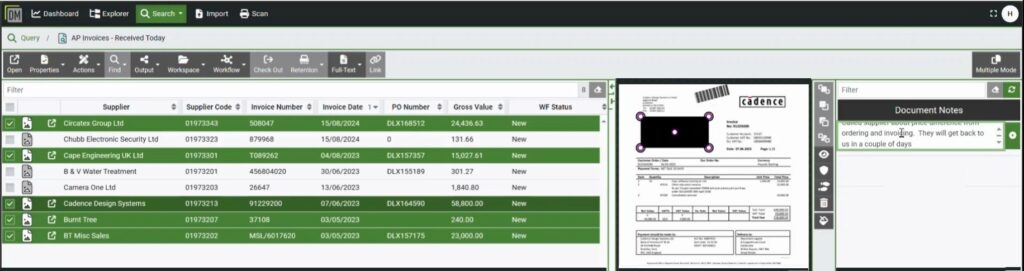
A Clear User Interface for Administrators and Accounting Professionals
Predetermined workflows are crystal clear to managers and staff in Document Manager’s intuitive user dashboards. The interface enables you to choose how results are returned with virtual preview and thumbnail options, as well as document view choices.
No programming skills required: build searches, sort, order, run queries, assign permissions, locate missing documents and data gaps, and customise dashboards to suit the needs of individuals and the accounts department.
Simple sidebar tools enable you to add notes, image and text stamps, annotations, and to redact (hide) sensitive information from unauthorised staff.
Accounting Software Customer Success Stories
While today digital document management is deployed in many departments, such as HR and Customer Services, it was first adopted by Accounts departments.
In nearly thirty years, Document Logistix has installed hundreds of accounting document management systems to help Accounts departments operate more efficiently.
In the early years, accounting firms and departments aimed to reduce paper and physical storage Latterly the objectives include systems integration, enhanced collaboration and assured compliance.
Among the concerns in AP and Accounts is that deploying a new finance system will take a long time, disrupt business and prove costly.
You will be interested to learn that deployment is faster today than ever before, even when multiple departments and multiple users have varying needs. Users quickly embrace our simple-to-use accounting document management system with its customisable dashboard.
Following the successful deployment of Document Manager in four different areas of the business, the Hillcrest Group Finance Manager said:
“With automated alerts on tasks, thresholds, authorisations and escalations, we can now be much more targeted and focused – for example, in the case of a payment dispute – and eliminate potentially relationship-damaging bottlenecks. The reports that were previously too complicated to generate more regularly than on a weekly basis, we can now do easily every day.”
Read the Hillcrest case study about rapid Accounts Payable digital document management deployment.
How does Document Manager ensure the security of our financial data?
Compliance in finance is critical. Document Manager gives you advanced security and has built-in compliance functions to help you adhere to industry regulations and data processing requirements such as GDPR.
Encryption
- End-to-end encryption of data when stored or in transit to prevent unauthorised access.
Redaction tools
- Use document redaction tools to hide parts of documents that contain information to be viewed only by authorised personnel.
Permission-based access
- Set dynamic permissions at system, folder and file levels to maximise document security.
Document Logistix’ Document Manager ensures the security of your financial data through several robust measures. Here’s how:
Data Encryption
The system employs end-to-end encryption to protect data both in transit and at rest, ensuring that sensitive information remains confidential and secure from unauthorised access.
Access Controls and Permissions
Document Manager offers granular access control, enabling administrators to define user permissions meticulously. Access controls ensure that only authorised personnel can access or modify specific documents, which enhances data security.
Audit Trails
Comprehensive audit logs track all document interactions, providing a detailed record of who accessed or modified data and when. This transparency aids in monitoring and maintaining data integrity.
Secure Centralised Storage
By consolidating documents into a single, secure document repository, Document Manager simplifies data management and reduces risks associated with dispersed storage systems.
Regular Security Updates
The platform is built on .NET 6.0, benefiting from enhanced security features and long-term support from Microsoft. Document Logistix also uses the Veracode® security platform to scan all products, ensuring compliance with industry-standard policies like OWASP and CWE.
Penetration Testing
Daily penetration testing enhances security by identifying vulnerabilities, preventing data breaches, ensuring compliance and safeguarding sensitive financial records against cyber threats and unauthorised access.
Collectively, these compliance features ensure that your financial data is securely managed within Document Manager, both during transmission and while stored.
Eliminate Accounting Bottlenecks
Effective document management allows finance staff to concentrate on higher value tasks as powerful search and productivity tools save time and put an end to effort wasted on document retrieval and protracted enquiries.
Document Logistix helps companies with effective standalone accounting solutions such as document scanning and indexing to achieve fast, secure storage and retrieval processes, all the way through to strategic accounting workflow solutions that integrate with your current in-house systems.
Automated Workflows ensure that company policies and protocols are embedded in your accounting systems so that procedures are followed correctly every time. Automation means that accounting process reviews, approvals and escalations take place in a timely manner that prevents bottlenecks.
We’d love to help your finance staff make the most of their abilities and help them to support the business in the most effective way using Document Manager.
Embed Accounting Best Practices
With Document Manager installed, you can embed and optimise accounting best practices document management software, Just follow these guidelines:
- Automate Data Capture
Use OCR and AI to scan and extract invoice details to reduce manual entry and errors. - Standardise Workflows
Implement consistent approval and payment processes to ensure efficiency and compliance. - Integrate with ERP and Business Systems
Seamlessly connect AP software with your ERP for real-time updates and streamlined financial reporting, as well as communication platforms such as Microsoft Outlook. - Enhance Security
Use encryption and role-based access controls to protect sensitive data. - Ensure Compliance
Set up audit trails, and store and retain documents according to HMRC legal requirements to meet financial regulations. - Monitor and Optimise
Regularly review accounting software processes to ensure ongoing efficiency.