
Document control: when and why is it important?
Every business depends on documents. Contracts need to be approved, policies need to be updated, procedures need to be followed and records need to be kept. In many organisations, documents are also the evidence that work has been completed correctly, decisions have been made properly and responsibilities have been met.
Yet the way businesses manage this information has not always kept pace with the way they work.
Documents are created in different applications, saved in shared folders, sent by email and copied between teams. People make changes, circulate revised versions and assume that everyone else is working from the same information. Most of the time, things appear to work. The problems emerge when somebody uses an outdated procedure, an approval is missed or an important document cannot be found when it is needed.
In these situations, document control becomes very important.
Document control is not simply a matter of organising files or giving documents meaningful names. It is about establishing a reliable way to manage information throughout its working life, from creation and review through to approval, distribution, revision and eventual retention or disposal.
For organisations dealing with large volumes of business information, document control software can make this process considerably more reliable. Document control software provides the structure, visibility and automation needed to keep documents under control without relying on people to remember every step.
This guide explains what document control means, why it matters, how document control software works and what to consider when choosing a system.
What is document control?
Document control is the process of ensuring that business documents are created, reviewed, approved, distributed, updated and retained in a consistent and controlled way.
The objective is straightforward: people should be able to find the information they need, understand whether it is current and know that they are authorised to use it.
Consider a company with a health and safety procedure that is updated following a change in working practices. The revised document needs to be checked, approved and made available to the relevant employees. The previous version may need to be withdrawn from everyday use, although it could still need to be retained as a historical record.
If this update process relies on emails, shared folders and manual reminders, there are several opportunities for something to go wrong. Someone might continue using the old procedure. Another employee might make an unauthorised change. A manager might assume the update has been approved when it has not.
A controlled process makes each stage clear. It records who is responsible, what has changed, which version is approved and when the new document becomes effective.
The same principles apply to contracts, financial records, customer documentation, technical drawings, operating procedures, HR policies and many other types of business information.
Document control is particularly important when accuracy, consistency and evidence matter. However, its benefits extend to any organisation that needs to manage information across teams, departments or locations.
Document control vs document management: what is the difference?
The terms document control and document management are closely related, but they are not quite the same.
Document management is the broader discipline of storing, organising, retrieving, sharing and managing documents across an organisation. A document management system can provide a central place for information, making it easier for employees to find what they need and work together.
Document control focuses more specifically on the rules and processes governing how documents are handled. This includes version control, approval, access permissions, revision history and the withdrawal of superseded information.
In practice, effective document control is often a core part of a document management system.
A document repository might store thousands of files and allow employees to search for them. A controlled document management system goes further by helping to ensure that the right people see the right versions, that changes follow an agreed process and that important actions are recorded.
The distinction matters when evaluating software. A system that simply stores documents may solve a filing problem without addressing the underlying risks associated with uncontrolled changes, inconsistent processes and unclear accountability.
Businesses should therefore look beyond storage capacity and consider how well a system manages the complete document lifecycle.
Why is document control important for businesses?
The case for document control is often made in terms of compliance, but its value is much wider. Poor control creates friction in everyday work, wastes employees’ time and can undermine confidence in the information on which decisions are based.
Preventing confusion over document versions
One of the most familiar problems in office work is knowing which version of a document is the correct one.
A contract might have been amended several times. A policy could have been revised by different departments. A technical document may have been circulated to several people, each making changes to a separate copy.
File names such as ‘Final’, ‘Final revised’ and ‘Final approved’ are not a dependable control mechanism.
Proper document version control establishes a clear history of changes and identifies the current approved version. Depending on the system and its configuration, previous versions can be retained for reference, changes can be attributed to individual users and access to approved documents can be managed centrally.
Effective version control helps to prevent employees from relying on information that is incomplete, outdated or no longer authorised for use.
Improving accountability and auditability
When a document is reviewed or approved, an organisation may need to demonstrate who carried out the action, when it happened and what was approved.
An effective document control process creates a record of these activities. Rather than reconstructing a chain of emails months later, employees can consult a consistent history of the document and its associated workflow.
The easy availability of an audit trail with accurate information is especially valuable during internal audits, external assessments, contractual reviews or investigations into how a decision was reached.
The Information Commissioner’s Office (ICO), in its guidance on accountability and governance, explains that organisations must be able to demonstrate their compliance with applicable UK GDPR requirements. Maintaining appropriate documentation is one part of that wider responsibility.
Document control software does not, by itself, make an organisation compliant. It can, however, help to provide the evidence and consistency needed to support sound information governance.
Reducing delays and unnecessary administration
Manual document processes often involve chasing people for comments, reminding managers to approve changes and checking whether revised information has been distributed.
These activities may appear minor individually, but they can become a significant burden when repeated across hundreds or thousands of documents.
Automated workflows can route documents to the right people, send notifications when action is required and record progress as work moves through each stage. Managers can see where a document is waiting and identify bottlenecks before they become bigger problems.
The result of workflow effectiveness is not simply a tidier filing system. It is a more efficient way of getting business-critical work completed.
Supporting consistency across the organisation
When employees work from different offices, sites or departments, maintaining consistent procedures becomes more difficult.
A centralised approach to document control helps to ensure that approved information is available to the people who need it. It also makes it easier to introduce changes consistently, rather than relying on individual managers to circulate updates and remove old copies.
For organisations that operate across multiple locations, centralisation can be particularly important in maintaining common standards and working practices.
What is document control software?
Document control software provides the technology needed to manage documents according to defined business rules.
Depending on the product, it may be part of a dedicated document management system, an enterprise content management platform or a specialist application designed for a particular industry.
The important distinction is that document control software does more than hold files. It supports the processes that govern their use.
A well-designed control system brings together document storage, indexing, version history, access permissions, approval workflows, audit trails and retention arrangements. More advanced platforms may also include automated data capture, integrations with other business applications and artificial intelligence to help users locate or interpret information.
The right combination depends on the organisation’s needs. A small business managing a limited number of internal policies will have different requirements from an engineering company controlling technical drawings or a financial services organisation managing sensitive client records.
The starting point to achieve control should always be the business process, not the technology itself.
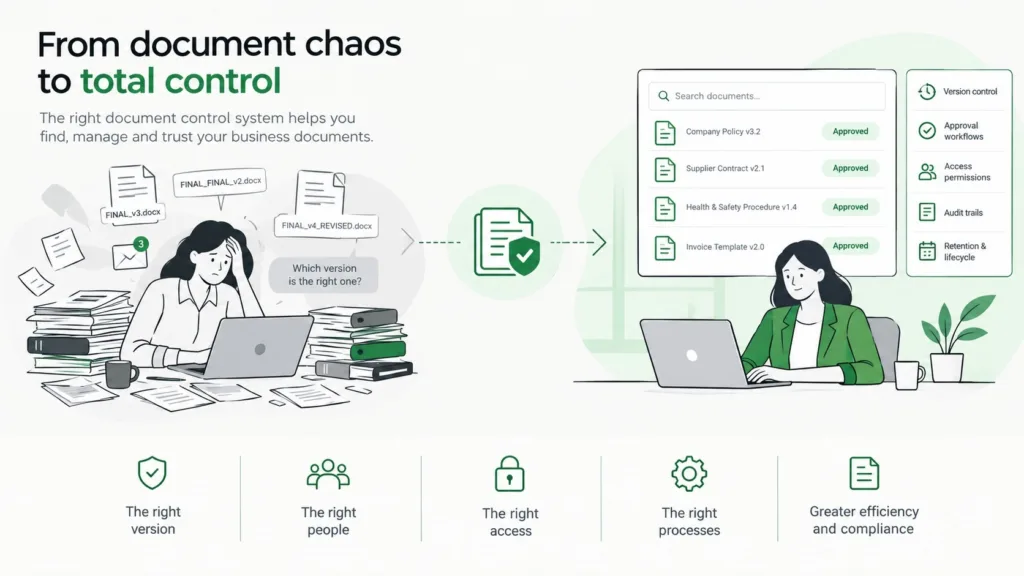
The essential features of an effective document control system
1. Centralised document storage and retrieval
Employees need a reliable place to find the documents they are authorised to use.
A central repository reduces dependence on individual desktops, personal folders and email attachments. Documents can be organised using metadata, categories, document types and other attributes that reflect the way the business operates.
Search is equally important. Users should be able to find information by using meaningful terms and relevant document attributes, rather than having to remember the exact folder path or file name.
The aim is to make the correct information easier to find than an uncontrolled copy.
2. Version control and revision history
A controlled document should have a clear version history, with a reliable way to distinguish current approved information from earlier revisions.
The system should support the organisation’s revision process and preserve relevant historical information. Where appropriate, it should record who made changes and when they were made.
It is also important to understand how the system handles documents that are being edited, reviewed or awaiting approval. A draft should not accidentally be presented as an approved document simply because it is the most recently saved file.
3. Document approval workflows
Most important documents pass through a series of checks before they can be used.
An approval workflow defines the people or roles involved, the order in which they act and the conditions that must be met before a document progresses. A policy might require review by a department manager and final approval from a compliance lead, for example.
Software can automate the routing, reminders and recording of these activities. It can also help make responsibilities clearer, reducing the risk that an important document remains unattended in someone’s inbox.
The workflow should reflect the real business process, including any necessary exceptions or additional approvals. Automating an unclear process will not make it a good one.
4. Access permissions and information security
Not every employee should have unrestricted access to every document.
A document control system should enable permissions to be assigned according to job responsibilities, departments, document sensitivity or other relevant criteria. Some users may need to read a document, while others may be authorised to edit, review or approve it.
Access controls should be supported by appropriate security measures, including authentication and monitoring when required. Organisations should also consider how permissions are reviewed when employees change roles or leave.
The objective is to make information available to the right people without exposing it unnecessarily.
5. Audit trails and reporting
An audit trail records relevant activity involving a document or workflow. Depending on the system, audit information might include creation, revision, approval, access or changes to permissions.
These records help to establish what happened and when. Reporting can then provide a broader view of the process, such as identifying overdue approvals, documents approaching review dates or workflows that regularly experience delays.
The precise level of detail and the controls protecting audit records vary between systems. Buyers should check that the software provides the evidence their organisation needs.
6. Retention and document lifecycle management
Documents should not remain in active circulation indefinitely simply because nobody has decided what to do with them.
Different records have different retention requirements. Some must be kept for defined periods, some need periodic review and others should be securely disposed of when they are no longer required.
An effective system can help apply retention rules, flag review dates and manage the transition from active documents to archived records or authorised disposal.
These rules should be based on the organisation’s legal, contractual and operational requirements. Software can help to implement them, but the organisation must still establish appropriate policies and take responsibility for their application.
7. Integration with everyday business systems
Document control is most useful when it fits naturally into the way people work.
Integration with business applications can reduce the need to switch between systems, duplicate information or manually transfer documents. Depending on the platform, this might include connections to finance, HR, customer relationship management, enterprise resource planning or Microsoft 365 environments.
The practical question is whether the system enables employees to manage documents as part of their current processes while maintaining the necessary control over information.
8. Automation and artificial intelligence
Automation can take document control beyond the management of individual files.
Documents can be routed automatically, information can be extracted from incoming records and workflows can respond to defined events. Artificial intelligence can add further capabilities, such as helping to classify documents, identify relevant information or answer questions using an organisation’s document collection.
These advanced capabilities need to be introduced carefully. AI-generated classifications or answers may require human verification, particularly when the information is sensitive or decisions have significant consequences.
The most valuable approach is to use automation and AI to reduce repetitive work and make information more accessible, while retaining appropriate human oversight and clear accountability.
What happens without effective document control?
The risks of poor document control are rarely confined to one dramatic incident. More often, they accumulate through small failures that gradually become accepted as normal working practice.
Employees waste time searching for information or checking whether a document is current. Managers repeat approval requests because the original decision cannot be found. Different departments maintain separate copies of the same policy. Important records become difficult to retrieve when an audit or customer query arises.
In more serious cases, an outdated procedure could lead to work being carried out incorrectly, an unauthorised change could affect a contractual commitment or a record might be deleted before it should be.
The National Archives provides guidance on managing digital records without an electronic document and records management system. Its guidance recognises that organisations still need sound information management practices even when they do not have dedicated supporting infrastructure.
This is an important point. Buying software is not the only way to improve document control, and smaller organisations may manage some requirements effectively through well-designed procedures. However, as document volumes, operational complexity and the number of people involved increase, manual controls become harder to maintain consistently.
The question is not whether every business needs the most sophisticated system available. It is whether its existing approach provides sufficient control for the information it handles and the risks it faces.
How to implement document control successfully
Introducing document control software should begin with an understanding of how documents are currently created, used and maintained.
Start by identifying the documents that matter most to the business. These might include contracts, approved policies, technical records, financial documentation or information subject to specific regulatory requirements. Establish where they are stored, who owns them, how they are approved and what happens when they change.
This review exercise often reveals that the problem is not simply a lack of software. Responsibilities may be unclear, approval stages may be unnecessarily complicated or different teams may be following conflicting procedures.
The next step is to define the controls that the organisation needs. Decide which documents require formal approval, who can change them, how versions will be identified and what records need to be retained. Establish review periods and agree what should happen when a document becomes obsolete.
Only then should the software be assessed against these requirements.
Implementation is also an opportunity to improve the way work is organised. There is little value in transferring a confusing collection of folders into a new system without addressing inconsistent naming, duplicate records and unclear ownership.
A phased approach to implementation is often sensible. Begin with a well-defined process or document category, test it with the people who will use it and refine the arrangements before extending the system more widely.
Staff training matters too. Employees need to understand not only which buttons to press but why the new process exists. If the system is difficult to use or appears to add unnecessary administration, people may continue to rely on familiar workarounds.
Finally, establish measures of success. Depending on the organisation’s priorities, these might include approval turnaround times, the number of overdue payments, time spent locating documents, duplicate records or the completeness of audit trails. Reviewing these measures after implementation helps to demonstrate whether the new approach is delivering practical value.
Document control and compliance
Document control can support compliance by helping organisations to manage information consistently and demonstrate how important documents have been handled. However, requirements differ according to the sector, the type of record and the legal or contractual obligations involved.
For example, the ICO’s guidance on documentation under the UK GDPR explains that organisations may need to maintain records of processing activities, including information about processing purposes, data sharing and retention.
That does not mean that every document must follow the same approval workflow or be retained for the same period. Rather, organisations need to understand their obligations and establish controls appropriate to the information they hold.
In regulated environments, document control may also form part of a wider quality management system, a formal records management policy or a documented operational procedure. The relevant industry standards and regulatory requirements should be checked directly rather than assumed to be covered by the software.
A system can make good governance easier to implement and demonstrate, but it cannot replace sound policies, trained staff or management oversight.
Choosing the right document control software
Choosing a system is about finding the right balance between control, usability and flexibility.
A useful starting point is to consider the complexity of the organisation’s document processes. How many documents need formal approval? How often do they change? Are there multiple departments, sites or external parties involved? What evidence must be available during an audit? Are there specific retention, security or integration requirements?
These questions help to distinguish essential capabilities from features that might be useful later.
It is worth examining how the system handles a real business scenario rather than relying solely on a product demonstration. Ask the supplier to show how a document is created, reviewed, approved, revised and withdrawn. Check what happens when an approval is rejected, a deadline is missed or a document needs to be retrieved in its earlier form.
Search capabilities deserve particular attention. A system may contain all the necessary information yet still be frustrating if users struggle to find it. Consider whether employees can search by document content, metadata and other relevant attributes, and whether the results can be restricted according to their permissions.
Integration and scalability also matter. A system should fit the organisation’s existing technology environment and be capable of supporting future requirements without forcing unnecessary changes to established business processes.
Finally, consider implementation support, training, ongoing administration and the total cost of ownership. The cheapest software is not necessarily the least expensive solution if it creates additional work or requires substantial customisation.
The best system is one that people will use consistently and that gives the organisation the level of control its documents require.
Why document control is becoming more important
The volume of business information continues to grow, and documents increasingly form part of connected digital processes rather than existing as isolated files.
A contract may trigger a workflow in a finance system. An invoice may need to be matched against a purchase order. A revised policy may need to be approved, published and acknowledged by employees. A customer record may draw together information held across several applications.
In this environment, document control needs to be more than a set of static rules. It needs to support the movement of information through the business, providing appropriate controls while allowing people to complete their work efficiently.
AI adds another dimension. Instead of relying entirely on employees to classify documents or search through folders, systems can increasingly assist with recognising content, extracting information and identifying relevant records. The benefits depend on the quality of the underlying information, the reliability of the technology and the safeguards put around its use.
For businesses considering these developments, the foundations remain the same: clear ownership, reliable versions, appropriate permissions, controlled workflows and a dependable record of important actions. New technology can build on those foundations, but it cannot compensate for their absence.
How Document Logistix can help
Document Logistix helps organisations to manage business documents and the processes that surround them through document management and workflow automation.
A well-designed document management approach can bring information together, make retrieval easier and establish consistent ways of handling documents across the organisation. Workflow automation can then reduce manual intervention to help documents move through review, approval and other business processes with greater visibility.
The right solution depends on the organisation’s existing systems, the documents it needs to control and the outcomes it wants to achieve. For some businesses, the priority may be version control and secure access. For others, it may be reducing approval delays, improving auditability or connecting document processes with wider business operations.
The starting point is to understand where the current approach creates risk or unnecessary work, then to identify the controls and capabilities that will make a measurable difference.
If employees regularly struggle to find the right information, if important approvals depend on manual reminders or if different teams are working from different versions of the same document, it may be time to review the way documents are managed.
Document control should make it easier to trust, use and manage business information. With the right processes and supporting technology in place, it can help organisations reduce avoidable errors, improve efficiency and build a more reliable foundation for the way they work.
Frequently asked questions about document control
What is document control software?
Document control software helps organisations manage the creation, review, approval, distribution, revision and retention of business documents. It commonly includes version control, access permissions, workflow automation and audit trails, helping employees work with the correct information and follow agreed procedures.
What is the difference between document control and document management?
Document management covers the wider process of storing, organising, retrieving and sharing documents. Document control focuses on ensuring that documents are handled according to defined rules, including how they are approved, revised, accessed and withdrawn. Document control is often an important capability within a document management system.
Why is document version control important?
Version control helps employees identify the current approved document and distinguish it from earlier revisions or unapproved drafts. It can reduce confusion, prevent outdated information from being used and provide a record of how a document has changed over time.
Does a business need document control software to be compliant?
Not necessarily. Requirements depend on the organisation, its industry and the records it handles. Some organisations can manage their obligations through appropriate procedures and existing systems. Dedicated software can make document processes more consistent and easier to monitor, but it does not automatically guarantee compliance.
Can document control software automate approvals?
Yes. Many systems support workflows that route documents to designated reviewers or approvers, issue notifications, track progress and record decisions. The available capabilities depend on the product and how the workflow is configured.
Is document control software suitable for small businesses?
Yes. Small businesses can benefit from having clear version histories, controlled access and reliable approval processes, particularly as their document volumes grow. The important consideration is choosing a solution proportionate to the organisation’s needs rather than introducing unnecessary complexity.
Can document control software work with SharePoint?
Depending on the product, document control capabilities can complement or integrate with SharePoint and Microsoft 365. The important consideration is whether the combined arrangement provides the required version control, approval workflows, auditability, permissions and lifecycle management. Businesses should assess their actual requirements before deciding whether their existing environment is sufficient.
How does AI improve document control?
AI can assist with classifying documents, extracting information, identifying relevant content and making large document collections easier to search. Its effectiveness depends on the data, the technology and the controls in place. Human review remains important where errors could have significant operational, legal or compliance consequences.
What should a document control procedure include?
A document control procedure should explain how documents are created, identified, reviewed, approved, distributed, revised and withdrawn. It should also define responsibilities, access permissions, version conventions, retention arrangements and the records that need to be maintained. The detail should reflect the organisation’s needs and applicable requirements.
How do you measure the effectiveness of document control?
Useful measures include the time taken to approve documents, the number of overdue reviews, the frequency of version-related errors, the time employees spend searching for information and the completeness of required audit records. The most relevant measures are those linked to the organisation’s original business objectives.
Conclusion: put control at the heart of document management
Document control is fundamental to reliable business information. It helps to ensure that documents are accurate, accessible to the right people and managed consistently throughout their working life.
For organisations still relying on shared folders, email chains and manual reminders, improving document control can deliver benefits that extend well beyond administration. It can reduce avoidable errors, make approvals more efficient and help employees spend less time searching for information.
Document control software provides a practical way to establish these processes at scale. When supported by clear procedures, appropriate governance and effective staff training, it can help transform document management from a collection of disconnected tasks into a controlled, integrated business process.
The real objective is not simply to store documents more efficiently. It is to give people confidence that the information they use is the right information, at the right time, with the right controls in place.