

What is Document Management Today? Your Guide.
A Document Management System (DMS) is a software solution designed to capture, store, organise, manage and retrieve electronic documents and business records from a secure central repository.
This guide explains how modern document management systems work, key DMS terminology, deployment options and best practices for successful implementation.
As organisations continue to generate increasing volumes of business documents, effective document management has become essential for maintaining productivity, compliance and operational efficiency. Businesses of all sizes must manage large quantities of paper documents, digital files, emails, invoices, contracts, policies, training records, delivery notes and other critical business information.
Traditional paper-based document storage creates significant challenges, including lost documents, duplicated information, inefficient retrieval processes and rising administrative costs. Studies show that paper remains one of the largest sources of office waste, with many printed documents never being collected or used.
A modern electronic document management system eliminates common process inefficiencies by digitising documents and providing fast, secure access to information. Advanced document search and retrieval capabilities enable employees to locate any document instantly, which reduces time spent searching for information and improves decision-making.
By centralising document storage and automating document control processes, a DMS improves collaboration, strengthens data security, supports regulatory compliance, reduces paper dependency and enables secure remote access.
The results of centralisation and automation are greater productivity, lower operating costs and more efficient workflow management across the organisation.
Document processing and records management are critical components of modern business operations. Organisations that rely on manual document workflows often experience delays, inconsistent processes, increased administrative costs and a higher risk of human error.
Modern document management systems streamline business operations by combining centralised document storage, workflow automation and electronic document processing. Automated workflows help organisations eliminate repetitive manual tasks, accelerate approvals, improve information accuracy and increase staff productivity.
Digital transformation initiatives increasingly focus on replacing physical documents with secure electronic documents that can be managed throughout their entire lifecycle. Benefits include improved document control, automated records retention, enhanced compliance, faster document retrieval and more efficient information governance.
When evaluating a document management solution, organisations should consider cloud document management, on-premises deployment and Software-as-a-Service (SaaS) document management options. Many modern systems also provide mobile app access, enabling employees to securely access, review and manage documents from any location.
Implementing an advanced document management and workflow automation platform helps organisations improve efficiency, strengthen compliance, reduce operational costs and create a more agile, productive workplace.

Document Management Systems Explained
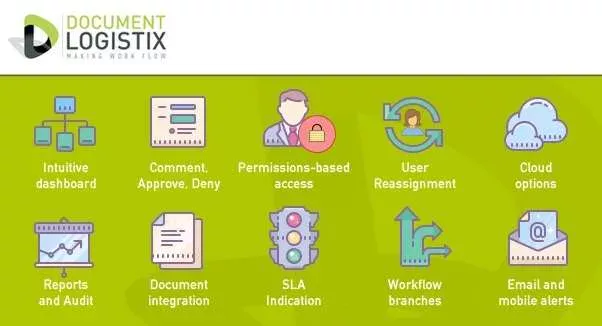
Document Management Systems today are powerful digital tools designed to help organisations capture data, store documents securely, and manage, track and work with documents systematically. The primary goal of modern document management technology is to streamline business operations by ensuring that important processes are automated, consistent and measurable.
Without well-implemented document management tools, it becomes increasingly challenging to establish reliable workflows, which results in inefficiencies and operational bottlenecks.
A document management system does not simply provide a storage solution; it creates an integrated system designed to manage the entire document lifecycle, from document creation to archival. That includes document capture as they enter your business in paper format or as digital files, including unstructured data such as emails.
Electronic documents serve as the foundation for organised, efficient and secure document management, and plays a vital role in modern business operations.
Document sharing is simple and safe, with the ability for team members to track documents, and built-in collaboration tools and version control that are essential for accurate records management.
By leveraging document management systems, companies can streamline their operations and enjoy office automation to ensure that important business processes are consistent and predictable. Without a robust document management system, it’s difficult to establish reliable workflows.
What is Data Capture in Document Management?
Data capture in document management is the process of collecting, extracting and converting information from physical or digital documents into structured, searchable data. It uses technologies such as scanning, Optical Character Recognition (OCR), barcode recognition and intelligent data extraction to identify key information from invoices, forms, contracts and other records.
The captured data is then stored centrally in a document management system for easy, fast retrieval, processing and analysis. Data capture reduces manual data entry, improves accuracy, speeds up workflows, enhances compliance and leads to better decision-making.
What is AI Document Processing?
AI Document Processing is the use of artificial intelligence technologies to capture, extract, classify and analyse information from documents automatically. It combines tools such as OCR), machine learning, natural language processing (NLP) and computer vision to process both structured and unstructured documents. AI-powered systems can identify key data, validate information and route documents to appropriate workflows with minimal human intervention.
AI improves accuracy, reduces processing time, lowers operational costs and boosts productivity. AI document processing enables organisations to manage large volumes of information efficiently while advancing digital transformation initiatives.
To understand document management systems, get to know to their key features:
Document Repository
A document repository is an essential part of document mnagement systems: it’s a secure central location for document storage and associated data. The repository can be hosted on-premises or in the cloud. Cloud-based storage is generally more scalable and cost-effective.
Industries that store high-risk data often require local storage to comply with strict data protection regulations.
Document Viewer
A key component of document management software is its ability to display digital documents and scanned paper files in an easy-to-use user-friendly viewer. Viewing options include complete document views and thumbnails. a document management system handles various file formats used in popular business software such as Adobe Acrobat, Microsoft Office and AutoCad, including PDF files, CAD drawings, JPEGs, Word docs, spreadsheets, videos, and more.
High-quality document management systems offer native format support, which enables users to view documents without converting them.
Workflow Automation Tools
One of the primary benefits of today’s document management systems is the automation of business workflows.
Documents are automatically routed sent to the right person or department, through pre-configured approval processes, both internally and externally, with minimal manual intervention. Document-centric workflow automation eliminates the risk of human error, helps to meet compliance requirements and greatly improves process efficiency.
Indexing and Searchability
Electronic document management enables precise classification and indexing of files and documents, to facilitate structured document storage and instant document retrieval. For instance, with proper indexing, users can quickly find invoices from July 2022 related to a specific client or project. Artificial intelligence helps to capture and index document content, metadata and digital images, while machine learning continues to optimise indexing, filing and search effectiveness over time.
Optical Character Recognition (OCR)
OCR technology converts text from scanned images into searchable data. For example, documents can be scanned, with key details automatically extracted and uploaded to the right location, person or department, for quick and accurate evaluation, approval or, if necessary, escalation to a senior decision maker.
Advanced Search Features
A robust document system offers full-text search capabilities, which enables users to search, find and retrieve documents based on keywords, document types, document fields, specific phrases and metadata within a document.
Integration with Existing Systems
A well-designed document management system offers seamless integration with other enterprise software.
Integration opportunities include Microsoft Office, Microsoft Dynamics and Google Workspace, accounting software like Sage Accounting, enterprise resource planning (ERP) platforms like SAP, and customer relationship management (CRM) systems like Salesforce, as well as mail servers such as Microsoft Outlook.
System integration ensures that data is centralised to support smoother workflows and eliminate the need to switch between systems.

The Shift to Cloud-Based Document Management
Many businesses are migrating from traditional on-premises systems to cloud-based document management, and this trend is accelerating.
Small businesses and large companies alike use Cloud and SaaS document management.
Cloud-based document management solutions offer some advantages, such as faster implementation, fewer IT resource demands and easy scalability. Scalability enables businesses to grow without being constrained by storage limitations.
Key Benefits of Cloud Document Management Systems:
Lower Cost
Cloud DMS services are typically available on monthly or annual subscriptions, which eliminates the high upfront infrastructure costs often associated with on-premises software.
Scalability
As your business grows, cloud document management easily expands to accommodate your needs without additional hardware investments.
Operational Flexibility
Cloud-based document management provides remote access which means that employees can work and collaborate efficiently from any location.
Key Benefits of On-Premises Document Management Systems
On-Premises document management offers several important benefits:
In-House Control
Full control over the system, stored data and infrastructure.
Security
Enhanced security and data protection for businesses handling high-risk data, such as in Finance and Healthcare. Sensitive information is stored in-house, behind your organisation’s firewalls, which reduces risks of third-party data breaches and cyberattacks.
Compliance
Easier to meet industry-specific legal standards and regulatory compliance requirements, as businesses can implement and monitor their own security protocols.
System Reliability
No dependence on external networks or internet connections, which ensures constant, easy access to documents.
Cost Predictability
Initial upfront costs with fewer ongoing subscription fees, making long-term budgeting more predictable.
An on-premises document management system is ideal for companies with stringent data security, document control and regulatory compliance needs.
In certain industries companies hold extremely high-risk data, such as healthcare and financial organisations, which makes it preferable to keep data, information assets and customer emails within their own IT infrastructure and behind their own firewalls.
Common Document Management Terms
Before implementing a document management system, it’s important to familiarise yourself with some key terms:
Document Capture
The process of importing documents into a DMS as they enter your business. Capture is also described as data acquisition and data collection. Information is uploaded by scanning paper documents and using OCR, by directly importing electronic files or forwarding files via email.
Document Imaging
Imaging refers to the conversion of paper documents into digital formats like PDF documents or JPEG graphics to make them easier to store, search and manage.
Document Version Control
Built-in document version control is an important feature that tracks changes made to documents. Users can revert to previous document versions when necessary, which is not simple with physical documents. Document version control is particularly useful for collaborative projects when multiple people may be editing a document. They are able to acess the latest version of a document as well as previous versions and any annotations.
Electronic Signature (e-Signature)
A secure, legally binding e-signature added to electronic documents for verification purposes. They are especially useful in industries that require strict verification and formal approvals, such as finance and healthcare. Electronic signatures are easier and faster to record than wet signatures. Digital records and e-signatures are admissible in court and meet legal requirements, and are commonly used for contracts management.
Key Benefits of Implementing Document Management Technology
Implementing document management technology can dramatically improve how your business handles documents and generate significant cost savings, as well as ensure that you meet your compliance requirements. Here is a selection of advantages to be expected:
Reduced Reliance on Paper
Going digital reduces the need for physical document storage space, which not only cuts costs but also improves business process efficiency. Employees spend less time searching for physical documents in filing cabinets and folders, which allows them to focus on more productive tasks.
Improved Document Accessibility
With new document management capabilities, employees can quickly locate and easily access the information they need, which improves all aspects of business productivity, in the back office – HR and Accounts – through to customer-facing departments such as Sales and Customer Service. Secure, centralised storage and reduced search times also minimise the risk of errors caused by missing or outdated documents.
Enhanced Compliance and Security
Robust audit trails, role-based access controls and versioning features make it easier to comply with industry regulations and compliance requirements. Document security and document lifecycle management are particularly important for businesses in highly regulated industries, such as healthcare, finance and legal services. Document Manager users value the system’s document control process, which includes automated document lifecycle management, to comply with data protection in line with GDPR.
Document Manager automatically ensures that documents are retained for mandated records retention periods and automatically deleted when the retention period ends. Managing document retention manually is a nightmare as so many documents have different retention requirements, across diverse industries, from student records and company pension records, to wills and legal documents. Digital information makes it simple to manage records retention.
Real-Time Collaboration
With centralised documents, remote access and document version control, team members can view and work on documents simultaneously, regardless of their location. Real-time collaboration promotes better communication, faster decision-making and more efficient teamwork.
Automation of Repetitive Tasks
With DMS, you can automate many time-consuming tasks, such as document filing, searching for and checking documents, and archiving or disposing of documents. Automating document routing and approval workflows saves time and reduces the risk of human error. Automation frees up employees to focus on higher-value work and, notably, liberates knowledge workers who historically wasted too much time searching for information.
Business Continuity; Disaster Recovery
Modern platforms provide a safeguard against disasters like data breaches, system failures or physical damage to offices. In the event of a disruption to your business, your documents remain safe and accessible to maintain business continuity.
Enhanced Data Security
With features like encryption, role-based access controls and document redaction, today’s platforms ensure that sensitive information remains secure. Only authorised personnel can access, edit or share documents which reduces the risk of data breaches. Document Manager undergoes daily penetration testing to detect and guard against cyberattacks, which guarantees the security of customer data.
Business Intelligence
DMS such as Document Manager have a built-in at-a-glance business intelligence dashboard that presents business data captured from multiple sources as charts, video and animations.

Why Do Businesses Upgrade Their Document Management Systems?
Companies’ prime motivations for installing document management software typically vary, but can be broken down as shown below by estimated percentage.
Assured compliance is a compelling reason to upgrade your document management. U.S. healthcare providers, for example, must comply with strict regulatory frameworks such as HIPAA (Health Insurance Portability and Accountability Act) and HITRUST to protect sensitive patient information.
All EU and UK companies have had to comply with GDPR (General Data Protection Regulation) since 2018. In the USA, schools and companies are extremely mindful of FERPA and CCPA, respectively.
So, while operational efficiency is the main reason why organisations upgrade their document management capabilities, compliance is a very important motivation, and a business driver that has become stronger in recent years.
Operational Efficiency (35-40%)
The top reason for many organisations for installing a document management system is improving workflow efficiency.
After uploading electronic documents, digitisation reduces time spent searching for documents, automates repetitive tasks and improves overall productivity … all managed in a simple user interface with customisable dashboard.
In addition, digitisation and centralisation save valuable time, eliminate data silos, reduce errors and facilitate remote access via desktop, apps and mobile devices.
Compliance Requirements (20-25%)
Regulatory compliance is absolutely critical in many industries (finance, healthcare, legal) but is an important reason for all businesses to evaluate their document management processes.
Digitisation helps meet regulatory compliance, legal requirements and industry standards for document security, data retention and auditing.
By limiting secure access to only authorised personnel, you protect sensitive data and institutional knowledge.
Cost Control (15-20%)
Reducing paper usage, paper storage and physical storage costs, and administrative expenses motivate companies to commit to digital transformation.
Extended benefits and enhanced cost control stem from systems integration, centralised documents and simple content management, which eliminate duplication of budgets as well as duplication of effort.
Enhancing Competitiveness (10-15%)
Companies want to stay competitive by embracing digital transformation, which supports stock control and lean production initiatives, as well as faster service delivery through effective, collaborative, modern document handling.
Notably, in Customer Services digitisation helps to boost customer satisfaction. In service departments information retrieval is key to success and working with paper records is slow. Digitisation ensuress that accurate information is instantly to hand and there is no reliance on legacy paper forms.Increasing Profitability (5-10%)
While indirectly impacted by efficiency and cost savings, profitability is another reason for installing DMS.
Streamlined operations support margin control and enhanced data analysis can lead to increased revenue.
Sustainability and Green Objectives (5-10%)
An increasing number of organisations upgrade their document management for environmental reasons, to reduce paper consumption and move towards greener business practices. Digitisation can play a big role in reducing resource consumption and cutting emissions.
A company that goes paperless can reduce its carbon footprint by up to 60%, according to AIIM (Association for Intelligent Information Management).
In future sustainability could become a higher priority to upgrade information handling.
Digital solutions can be installed to support the circular economy and could help to generate massive economic benefits.
Progressive companies are already using digital product passports to track materials for easier recycling and reuse.
These system adoption percentages reflect typical business priorities for investing in document management solutions, although the exact breakdown may vary based on industry and company size.


How Do Different Departments Benefit from an Advanced Document Management System?
Different departments within an organisation have unique document and file management needs. Nevertheless, advanced document management that centralises documents can access each department to generate company-wide efficiencies, automated workflows and operational advantages.
Users can work within a familiar HR or Accounting front-end while documents are held and managed securely within a unified document managment system. The document system enables users to collaborate in real-time with check-in/check-out functions to manage version control and maintain accurate document histories.
Let’s explore how various teams can leverage better document management to improve their operations:
Human Resources (HR)
The HR department handles critical employee-related documents, such as resumes (CVs) and applications, staff contracts and employee onboarding documents, performance reviews, and all types of files and documents throughout an employee’s employment, including holiday requests, disciplinaries and payroll records.
A digital document management solution enables HR professionals to store, retrieve and manage multiple document types in a centralised location to streamline business processes such as recruitment, hiring, new hire onboarding and employee record management. Digitisation helps at every stage, from quick document creation for welcome letters, to the provision of staff self-service document portals to enhance employee engagement.
Document processing automation features and workflow automation help HR teams send digital welcome packs and manage approval workflows, which makes new hire onboarding more efficient. The complexity of managing HR processes and associated documents can be reduced by powerful compliance tools, such as automated data retention and purge, and functions to help identify missing documents such as proof of ‘Right to Work’.
Finance and Accounting
The finance department processes large volumes of paperwork, including invoices, receipts, bank statements and financial reports. Document management software simplifies these tasks by capturing documents electronically, automating document routing and approval workflows, and ensuring compliance for painless financial audits. Converting to digital processes significantly reduces the time spent on manual data entry and document retrieval, which improves operational efficiency and reduces the risk of errors.
Legal
Legal departments need foolproof document management solutions to manage contracts, case files and legal documents securely. For legal professionals, compliance with strict regulations, quick case file retrieval and audit-readiness are mission critical.
Business Operations
Any operations department using advanced document management is able to improve workflows by automating document routing and approvals. Transparency, management line-of-site and advanced reporting all contribute to better decision making.
Sales and Marketing
Sales teams often rely on quick access to important documents like contracts, proposals and marketing materials. Document Manager provides a centralised repository where important documents can be stored, indexed and retrieved easily. Timely access ensures that sales representatives have the right materials at their fingertips, which reduces the likelihood of lost deals owing to document-related delays and boosts customer satisfaction.
Every Department. Every Industry.
Today, every department in every industry can benefit from digital document management integrated with an organisation’s existing business systems. Centralised data means that the system user never has to leave their familiar software environment, which helps with system adoption.
Accounting software can ‘speak to’ ERP, CRM and customer-facing systems such as Salesforce and Microsoft Dynamics. HR systems are integrated with Payroll and Training systems. The benefits of an integrated DMS system are seen across commercial organisations such as in the retail sector, the automotive industry and transportation, as well as in government agencies and not-for-profit organisations, including hospitals and healthcare.
Centralised data means that authorised DMS system users have immediate access to up-to-date, version-controlled information in real-time, when in the office or working remotely, on any connected device, or using web services, including access via mobile devices.
Document Management Solutions for Every Industry
Document Management for Education
Schools, colleges and universities manage student records, staff files, admissions documents and policy information. A document management system securely stores and organises information to make it easier for authorised users to find what they need. Automated workflows reduce administrative workload, improve efficiency and support compliance with data protection requirements across educational institutions.
Document Management for the Public Sector
Public sector organisations manage records, correspondence, policy documents and case files across multiple departments. A document management system improves document accessibility and supports compliance, information governance and records retention requirements. Automated workflows reduce administrative burdens to help organisations improve operational efficiency and deliver better services to citizens.
Document Management for Logistics and Transport
Logistics and transport businesses rely on accurate documentation for deliveries, contracts, invoices and compliance records. A document management system centralises information to improve visibility and enable faster document retrieval. Automated workflows streamline document processing, reduce paper-based administration and support compliance requirements to help organisations operate more efficiently across the supply chain.
Document Management for Manufacturing
Manufacturers manage quality records, work instructions, supplier documentation and compliance paperwork daily. A document management system centralises information to ensure employees always access the latest approved documents. Automated workflows support quality control, change management and regulatory compliance and reduce manual administration. Fast search capabilities improve productivity and help teams respond quickly to audits and operational requirements.
Document Management for Construction
Construction businesses handle contracts, drawings, permits, health and safety records and project documentation. A document management system provides a secure central repository with version control to help teams avoid costly errors caused by outdated information. Mobile access enables site staff to retrieve documents wherever they are working, which improves collaboration, compliance and project efficiency.
Document Management for Healthcare
Healthcare organisations must securely manage patient records, policies and administrative documents while meeting strict compliance requirements. A document management system improves information accessibility, reduces paper-based processes and strengthens data security. Automated workflows streamline document handling, while audit trails and access controls support regulatory compliance and efficient healthcare operations.
Document Management for Financial Services
Financial organisations manage contracts, customer records, compliance documents and audit information. A document management system centralises critical data, improves security and provides complete audit trails. Automated workflows accelerate approvals and reduce manual processes to help organisations improve operational efficiency, strengthen governance and maintain compliance with regulatory requirements.
Document Management for Legal Firms
Legal firms handle large volumes of contracts, case files and client documentation. A document management system provides secure storage, version control and advanced search functionality to help legal professionals access information quickly and accurately. Automated workflows improve document review processes while audit trails support compliance, accountability and information security.

Best Practices for Successful Document Management
To maximise the benefits of your document management system, consider the following best practices:
Create Standard Operating Procedures (SOPs)
Establish clear guidelines – SOPs – for how the system should be used to ensure user competence, consistency and compliance across your organisation.
Capture Documents as They Enter Your Business
Wherever possible, digitise documents at the point of entry in to your business to ensure they are easily searchable and accessible throughout their lifecycle.
Enhance Historical Workflows
Use the document management software’s capabilities to redesign workflows and business processes, to make them more efficient than their previous paper-based counterparts.
Implement Role-Based Access Control (RBAC)
Define and assign user roles with specific access levels to ensure that confidential information is only accessible to authorised personnel. This minimises the risk of data breaches and supports compliance with data privacy regulations.
Regularly Audit and Update the System
Conduct periodic reviews of your system to ensure it remains aligned with organisational needs and technological advancements. Update workflows, permissions and features as necessary to keep the system efficient and relevant.
Steps to Improve Document Management
Implementing an effective electronic document management system involves several critical steps. Here’s how to ensure a successful rollout:
Identify Document-Heavy Workflows
Start by identifying the areas of your business where document management poses the biggest challenges. Common areas include finance, HR and legal departments.
Focusing on these workflows will help you realise the most significant productivity gains in your new workflow system.
Pinpoint Integration Opportunities
Ensure that your new document management set-up integrates seamlessly with your existing business systems, such as ERP, CRM, HR and communication platforms.
Ensure your technology partner is able to integrate with leading platforms. Systems integration will improve efficiency and support effective data migration, especially at times of merger and acquisition..
Focus on Automation
Use the new management system to generate electronic documents and automate repetitive tasks to streamline workflows for maximum efficiency.

Frequently Asked Questions (FAQs)
Q. What Does a Document Management System Do?
A. A document management system stores, retrieves and manages documents digitally to provide better access, upgrade security and support workflow automation.
Q. Why Do I Need Document Management Software?
A. You need a document management software upgrade to reduce the inefficiencies and costs associated with paper-based processes, to secure staff and customer information, and reinforce compliance measures.
Q. What is a Document Management Plan?
A. A document management plan outlines how your organisation handles, stores, retrieves and secures documents to ensure consistent practices and compliance with regulatory standards.
Q. What Types of Documents can be Stored?
A. A complete range of documents, including scanned paper documents, PDFs, Word files, spreadsheets, digital images and videos.
Q. Is Document Management Software Secure?
A. Yes, the best DMS offer centralisation, encryption, secure access controls, data redaction and complete audit logs to ensure document security.
Q. How does Document Management Improve Collaboration?
A. Multiple users can access, edit and comment on documents in real time to boost teamwork.
Q. Can DMS Integrate with Other Software?
A. Yes, advanced document management systems like Document Manager can integrate with all your existing business systems, such as SAP, Sage, Salesforce, Microsoft and other important business tools.
Q. What Are the Benefits of DMS for Compliance?
A. Digitisation means that documents are stored securely, with version control and audit trails, to help adhere to data protection laws, with automated retention and deletion so you don’t keep data longer than you are legally allowed.
The Future of Document Management
Automated Data Classification
AI and machine learning can automatically categorise documents based on their content and metadata which eliminates the need for manual sorting and increases organisational efficiency.
Smart Search Capabilities
AI-powered search functions enable more accurate and context-based searches to enable users to retrieve relevant documents quickly, even when unstructured data is involved.
Enhanced Security
AI helps detect anomalies in document access patterns to provide better protection against security breaches or unauthorised access.
Optical Character Recognition (OCR)
AI improves OCR technology and enables the conversion of scanned documents or handwritten scripts into editable, searchable formats.
Predictive Analytics
Machine learning technology analyses document usage patterns to provide insights into workflow optimisation by predicting document needs, which enables more proactive management.
Process Automation
AI can automate document workflows, approvals and updates to streamline tasks like contract reminders and renewals, or compliant document retention tracking.
Technological advancements are making document management smarter, faster and more secure.
Ready to Transform Your Business?
Document Logistix offers flexible, scalable document management solutions tailored to businesses of all sizes. Whether you’re a progressive startup, SME or a large enterprise, we have the tools, experience and expertise to help you streamline your document management, unlock greater efficiency and control all your important business documents.
Minimise time-consuming manual processes, enjoy secure document storage and automated workflows, and manage operations via an intuitive, customisable user interface. Is it the right time to upgrade your document administration? We’d be delighted to help you with your business plan and determine likely ROI.
Contact us today with your document management questions or to arrange a demonstration
Why Choose Document Logistix: Comparison Chart.
| Feature | Document Logistix | Typical DMS |
|---|---|---|
| Cloud | ✓ | ✓ |
| On-premise | ✓ | Often limited |
| Hybrid deployment | ✓ | Sometimes |
| Workflow automation | ✓ | ✓ |
| AI extraction | ✓ | Varies |
| UK and USA support | ✓ | Varies |
Related Articles
A Complete Guide to Digital Document Management
Sustainable Document Management
Compliance Automation in Document Management
Tip 1: Transitioning to Digital
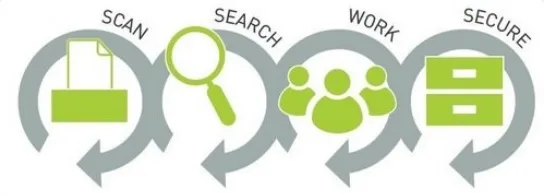
Transitioning from paper-based or hybrid systems to a digital system involves a strategic approach.
Begin by assessing your current document workflows, identifying key areas for improvement and setting clear objectives for the digital transition.
Digitise paper documents using high-quality scanning tools and categorise them systematically to ensure easy retrieval. Document Logistix provides an in-house back-scanning service to digitise legacy records and paper archives.
Implement a system that supports robust search functionality, automated workflows and secure storage. Define access controls based on roles to maintain data security and compliance.
Train employees on the new software to ensure a smooth adoption process. Develop Standard Operating Procedures to promote consistency in document handling. Periodically audit and optimise the system to ensure that it continues to meet your business needs.
A fully digital system not only reduces manual effort and storage costs but also enhances accessibility, collaboration and regulatory compliance across the organisation.
File Servers vs Database-Supported?
Using file servers, network drives and similar tree-structured storage systems to manage documents often replaces a physical issue with a digital one. Documents can become lost within complex directory structures. Maintaining order requires strict adherence to naming conventions and keyword tagging. These systems often fall short.
Relying on file storage as a substitute for a dedicated management system can be inefficient. Searching for document content may not be possible, metadata is frequently absent, and essential features such as workflows and version control are lacking.
Drawbacks to File Servers:
- Disorganised and complex directory structures
- Requires strict adherence to archiving practices
- Limited or no search functionality for document content
- Lacks essential features such as metadata, a workflow system and version control
The best document management systems typically follow a structured process: a document is captured, relevant information is extracted and a unique document ID is assigned. Both the document and its metadata are then stored in a database. The primary advantage of this approach is that the document remains easily identifiable to prevent it from getting lost within the system.
Document Logistix’ Document Manager provides a web-based client to enable users to access the system directly through a browser without needing local software installation.
Cloud-based document management offers additional benefits beyond accessibility. As with other SaaS models, the provider typically handles system maintenance, including routine updates and automated backups to ensure smooth operation.
Read more about DMS Comparisons with Storage Systems: SharePoint, Google Drive and OneDrive
Tip 2: Version Control Importance
Streamline version control by storing all your documents in one location where all document revisions can be tracked and managed automatically.
Centralisation and document control support file sharing, co-editing and real-time collaboration.

Each time a document is edited, the system creates a new version while preserving previous document versions and their iterations.
Dynamic version control ensures users can access a document’s full revision history, compare changes, and restore previous versions if necessary.
Document version control functionality eliminates confusion caused by multiple copies of the same document, often stored in different physical or electronic locations, or shared through email. Version control also prevents the risk of overwriting critical information.
Version control is essential for collaboration, especially in environments where multiple users work on the same documents.
Document control ensures that teams are always working on the most current and accurate version.
Moreover, version tracking supports compliance with regulatory requirements by providing a time-stamped audit trail, for transparency and accountability.
Efficient Information Distribution
When information is entirely digital you eliminate media gaps. One of the key benefits of digitisation is its ability to store and route documents automatically to the appropriate location, based on predefined categorisation.
By analysing extracted data, the system can identify precisely whether a document is an invoice, a contract, or a delivery note.
Categorisation is where the true value of modern document management becomes evident as information can be distributed promptly and accurately.
Digital Processing and Workflow Automation
Emjoy fully digital document transport and processing across departments within a structured workflow
Notably, the actual document is not sent; instead, a link to the document is provided.
Notifications are delivered either through the system itself or via email, ensuring that the document remains accessible to all authorised employees throughout the workflow.
Collective authorised access eliminates the need for multiple document copies and prevents confusion caused by version discrepancies.
Digital systems support two types of workflows: ad-hoc workflows for occasional, unstructured tasks and fixed workflows for repetitive, standardised processes.
- Ad-hoc workflows are flexible and can be created quickly when needed. They are ideal for handling unexpected tasks that arise in daily operations. For instance, if recurring errors are detected in a supplier’s invoices, a user can notify a colleague immediately to address the issue, ensure timely payment and avoid late fees.
