What is Document Workflow Automation Software?
Document workflow automation software helps organisations to streamline business processes by automating document routing, approvals and data capture. From invoice processing to HR onboarding, automated workflows reduce manual tasks, improve accuracy and provide complete visibility over document lifecycles.
Automate Document Workflows from Capture to Approval to Disposal
Modern organisations handle a constant flow of documents – from invoices and HR records to contracts and compliance files. Document workflow automation software streamlines this entire lifecycle to ensure every document moves efficiently from capture to processing, approval and secure archiving.
At the capture stage, documents are digitised using tools such as OCR and intelligent data capture. Whether it’s incoming invoices, employee onboarding forms or signed contracts, key information is extracted and made instantly searchable. Intelligent capture eliminates manual data entry and reduces the risk of errors from the outset.
Once captured, documents move into the processing phase, where they are automatically classified, indexed and routed based on predefined rules. For example, invoices can be matched to purchase orders, HR documents can be assigned to employee records, and contracts can be categorised by type or department. Accurate indexing ensures that every document is organised and ready for the next step without manual intervention.
During the approval stage, workflows route documents to the right people at the right time. Automated notifications, role-based permissions and escalation rules help to speed up decision-making while maintaining full control and accountability. Finance teams can approve invoices faster, HR can streamline onboarding and legal teams can review contracts with complete visibility.
Finally, all documents are securely archived in a central repository, where they remain fully searchable and audit-ready. With built-in version control and audit trails, organisations can quickly retrieve any document, track its history and ensure compliance with regulatory requirements.
By automating the full document lifecycle from capture through process and approval to archive and deletion, businesses can reduce manual workloads, improve accuracy and gain complete visibility over critical processes.
Document workflow automation software for small, medium and large businesses
Find out how Document Logistix can help you to automate complex document management simply and efficiently to help staff manage processes and your company to manage compliance. With document workflow automation software, from the moment information enters your company, you can automate each stage in the document life-cycle.
Document management software embeds repeatable processes that reduce organisational risk and reduce operational costs.
Learn how workflow automation boosts your document management system and enables you to manage the entire document lifecycle.
Control Compliance Processes
Fast and efficient, Document Logistix automation software saves people time and frees them for more strategic work.
Integrate for Efficiency
Document Logistix automation software integrates with leading CRM, ERP, DMS, ECM systems to create business-wide intelligence across dynamic sources
Document Storage Options
You have document storage options, including on-premises and Cloud-based storage, to give you maximum access and security.
Learn more about what workflow management is and how you can use automated workflow management profitably for your company.
Reasons for document workflow automation
With an effective workflow management system deployed, organisations can standardise and automate any workflow that drives important business processes.
The potential for new levels of business effectiveness and employee productivity is excellent. The entire company benefits from error-free, efficient workflows.
What is digital workflow management?
Digital workflows are used to automate business processes. With digital workflows, historical manual and/or paper-based processes are digitised, mapped and automated using software.
Digital workflow management determines which person, or which department performs specific steps in a process and when.
Digital workflows have a defined starting point, then key steps in a process that may or may not require someone to make a decision or approve a step, and a defined endpoint, which is typically archived document retention or data purge.
The definition of workflow management is straightforward: Decision-makers define rules about how business processes are handled in the company and assign tasks. Workflow management also specifies which processes start a workflow. For example, capturing details from an incoming invoice or other document, then automatically indexing, storing and routing the document.
Specified deadlines, a payment threshold or a status change of a document in the document management system can also start workflows, the flow of which can be monitored in the user’s dashboard.
It is worth noting that different workflows can operate in and between departments in the same company.
A workflow management system helps to model, control and optimise the processes and procedures of workflows and their separate work steps
Substitution rules enable the assignment of tasks to groups of people. Therefore, tasks can be assigned automatically to the first member of staff with free capacity.
Automated document workflow management means that workflows can be assigned independent of human intervention.
The benefits of workflow automation
The latest workflow automation management systems give you the opportunity to review your business processes and automate aspects of them to make the business more efficient and make life easier for users too.
Typical document workflow software prescribes how information is treated when it enters the business, and how it is processed, with checkpoints for comments, annotations and approvals, prior to actions, reports and eventual archiving and deletion.
One of the big advantages of an automated digital workflow based on electronic documents is that project status is always clear, and there is a secure record of all activity.
Workflow document automation can be applied to business functions such as accounting and HR processes or to production such as supply chain and manufacturing processes. Workflow precision liberates users and protects the business.
What does document workflow automation software do?
A document automation system:
- Allows you to eliminate manual tasks and automate repetitive processes
- Creates alerts automatically on uncompleted tasks in the process
- Provides a dashboard picture of the entire workflow along with performance metrics
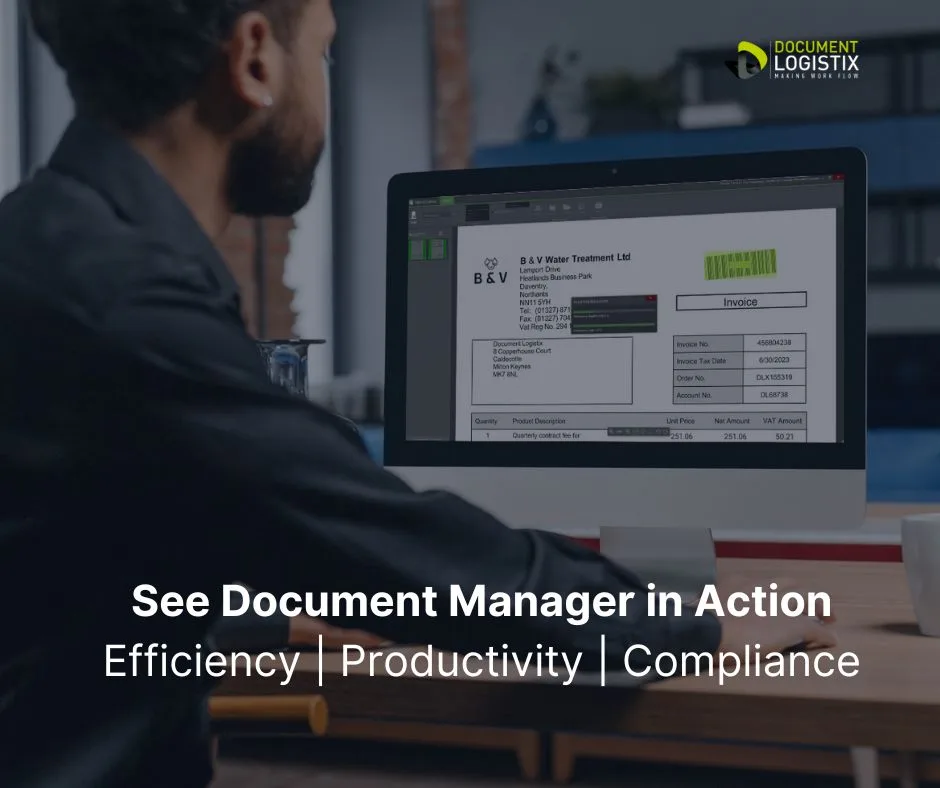
Document Manager: all the advantages of document workflow automation

Automate processes – right for the business and users
Workflow logic should follow what is right for the business and the logic should be apparent to users. Automate processes as a straight line with key steps that require input, approval or denial.
Document workflow automation best practices
Document workflow automation streamlines and optimises business processes to improve efficiency and reduce human errors. Here are some best practices for implementing document workflow automation:
1. Identify and map workflow
- Analyse Current Workflow
Begin by mapping existing workflows and processes. Understand each step, identify bottlenecks, redundancies and inefficiencies. - Define Key Stages
Break down the workflow into clear stages (e.g., creation, approval, review, distribution, file sharing) and define how documents should flow between them.
2. Set Clear Goals
- Identify Objectives and Measure KPIs.
3. Choose the Right Automation Tools
- Evaluate Software
Select software that aligns with your workflow needs and integrates with your existing systems (ERP, CRM, CMS), and provides scalability.
4. Incorporate AI and Machine Learning
- Automate Complex Decisions
Use AI for automating more complex decision-making processes (e.g., routing approvals). - Leverage OCR Technology and NLP
Use Optical Character Recognition (OCR) and Natural Language Processing (NLP) to process and categorise unstructured data.
5. Ensure Clear Role-Based Access Control
- Maintain Security Protocols
Define user roles clearly and implement role-based access to ensure sensitive.
6. Automate Approval Workflows
- Streamline Approvals
Set up automated approval workflows to route documents to the appropriate people based on rules. - Use Notifications
Automate reminders and notifications for pending approvals or deadlines to avoid bottlenecks.
7. Ensure Compliance and Security
- Audit Trails
Implement audit trails for each document’s journey within the system to ensure traceability, security and regulatory compliance (e.g., GDPR). - Data Encryption
Use encryption for data security, as well as redaction and automated data retention and purge.
8. Provide User Training and Support
- Train Teams
Ensure that employees are trained on how to use workflow automation tools effectively.
By adhering to these best practices, organisations can effectively implement document workflow automation, resulting in greater efficiency, improved accuracy, and enhanced compliance.

KPI reporting and workflow modifications
Document Logistix’ workflow system, Document Manager, provides you with key advantages. Document Manager’s real-time KPI-based reporting enables you to analyse any bottlenecks.
Completed and outstanding tasks are clear in the customisable user interface for every user, from those tracking invoice processing to HR teams managing complex HR records.
The user interface dashboard is invaluable for checking on time-critical documents such when using accounting software or in contract management.
Document Manager’s Dynamic Workflow Designer also enables you to drag and drop workflow changes, and rollback, without any need for programming skills.
Visualise, design and implement document-centric workflows
Optimise proceses. Simply Drag and Drop your new, redesigned workflow into your document management system to implement automated document processes, from simple purchasing workflows, to complex supply chain workflows.

SLA status indicators
With Document Manager you will be able to review many automated document processes at once, so you can see which ones need attention. Data extraction at the time documents enter your business determines document flow and controls records management throughout the information lifecycle.
Automated alerts to keep users engaged
People will abandon a workflow platform if they are not reminded to return when needed. Document Manager sends notifications via email or push notifications to mobile to alert document management system users about their tasks. Embed collaboration tools to boost user engagement.
Parallel workflow activities
Workflows are sequential, but some may have several strands that happen at the same time. Take a travel expense. It usually needs a manager’s approval, but instead of creating different workflows for each department, you can create one workflow for specific tasks.
Role-based access control
Workflows frequently contain sensitive confidential information that cannot be shared with everyone. Document Manager allows you to automate and customise what each user can see and edit in order to protect sensitive data.
Integration with leading business systems
Workflows do not operate independently of other processes. Documents, sales reports, cash-flows and calendars are important elements to be included as a part of an automated workflow. Document Manager allows you to integrate with leading business systems.
Popular integrations include Sage Accounting, SAP, Microsoft Dynamics and Google Workspace.
Flexible product licensing
Document Logistix is an innovative company that owns its automation IP and appreciates the customer’s need for value. We licence our document management system products fairly to reflect the users’ true needs, from administrator to occasional user.
Cloud-based technology
Choosing a Cloud-based document automation system is frequently the right step. Users can review actions, give approvals and access data and reports from any location. Cloud-based platforms also reduce up-front investments in hardware, software, maintainence and update costs.
At Document Logistix, we also offer on-premises solutions for organisation handling high-risk data, as well SaaS options for entry-level document management
Workflow automation reduces manual processing risks
Manual processes are error prone and hamper productivity. The more stages a document goes through, the greater the potential for errors and bottlenecks to occur.
If workflows in your organisation consist of sharing paperwork, saving documents in network folders or sending emails to colleagues and suppliers to trigger actions – document workflow automation software will significantly boost productivity and ensure regulatory compliance.
Which departments use document workflow automation software?
Automated document management is widely used across various departments to enhance efficiency and accuracy.
- Human Resources (HR)
Intelligent document management automates new hire onboarding processes, employee file management and performance reviews. - Finance and Accounting
Streamlines complex Accounts Department document workflows for invoice processing, approvals and expense reporting. - Legal
Manages contracts, regulatory compliance and case documentation with built-in document version control and audit logs. - Sales and Marketing
Automates proposal approvals, contract signing with e-signatures and CRM integration. Plus assists with document creation, pre-c0nfigured self-service templates for contracts and secure file sharing. - Procurement
Simplifies records management for quotation tracking, POs, supplier contracts and approvals. Frequently integrated with warehouse inventory management and stock control. - Operations
Enhances document generation, supply chain management, inventory tracking and standard operating procedures (SOPs). - IT
Automates service requests and data backup processes, and helps IT support staff to track documents and work orders to ensure maximum systems up time. - Customer Support
Streamlines ticketing systems, knowledge base management and SLA tracking. Storing digital files in a centralised repository is an important aspect of task management and process automation that gives knowledge workers a complete view of customers and their business transactions.
How to implement automated document workflows
There are key steps for starting with document workflow software . For a successful implementation:
Identify the right workflows
Digital document management is best suited for document-centred workflows like those in finance, sales, HR and procurement. Automated workflows enable employees to transition from time-consuming manual workflows to productive digital ones.
To help you identify valuable integration points, start with the ones that yield substantial productivity gains, such as invoice processing and employee onboarding.
How Document Workflow Automation Helps Organisations Go Paperless
The transition to a paperless environment has become a strategic priority for organisations and departments across various industries.
Document workflow automation plays a pivotal role in this transformation by digitising processes, reducing reliance on physical paperwork and streamlining operations.
By leveraging advanced technologies, companies can not only minimise their environmental impact but also enhance efficiency, security and collaboration within their teams.
Here’s how document workflow automation helps organisations and departments achieve a paperless workplace.
Streamlining Document Handling Processes
In traditional setups, managing physical documents involves multiple manual steps, including printing, signing, scanning and storing paperwork. These tasks are not only time-consuming but prone to errors such as misfiling or loss.
Document workflow automation eliminates inefficiencies by digitising the entire document lifecycle.
For example, in HR departments, onboarding employees can require the completion of multiple forms, contracts and personal documents. Automating this workflow ensures that documents are securely routed through a predefined process, which reduces paperwork delays and the need for physical copies.
Improved Collaboration and Accessibility
Document workflow automation also enhances collaboration across departments and teams. In a paper-based system, sharing documents often requires physical hand-offs or scanning. With workflow automation, digital documents are stored in centralised repositories that authorised personnel can access anytime, from anywhere.
Document management software also affords you maximum data security and assured compliance, with security features such as encryption, redaction functions and automated retention policies to handle document archiving and deletion.
Collaboration tools enable real-time editing, version control and secure sharing.
For instance, legal departments working on contracts can easily share drafts with multiple stakeholders, track changes and finalise documents without printing any hard copies.
Digitisation improves communication and speeds up decision-making.
Enhanced Security and Compliance
Paper documents are vulnerable to theft, loss and unauthorised access, which poses security risks for organisations handling sensitive high-risk information.
Automated document workflows help to mitigate these risks and enable organisations to meet legal requirements and adhere to industry regulations by offering secure digital alternatives.
Encryption, strict user controls and comprehensive audit trails ensure that only authorised personnel can access or modify documents.
Moreover, automation helps organisations comply with regulatory requirements regarding data retention, privacy protection and document security. Digital documents can be tracked and archived easily to ensure that they are stored in compliance with industry standards such as GDPR or HIPAA.
For example, healthcare organisations can automate the management of patient records to ensure that sensitive medical information is protected by strong security while reducing reliance on paper.
Cost Savings and Environmental Benefits
Moving away from paper-based workflows can lead to significant cost savings for organisations. Expenses associated with printing, paper storage and physical mail can add up quickly, especially for large enterprises.
Document workflow automation reduces costs by minimising the need for physical resources and manual labour.
Additionally, the environmental benefits of going paperless cannot be overstated. By reducing paper consumption, organisations contribute to sustainability efforts, minimising their carbon footprint and promoting greener business practices. This not only benefits the environment but also improves corporate social responsibility (CSR) efforts, which are increasingly important for businesses aiming to maintain a positive public image.
Boosting Productivity and Efficiency
Automating document workflows can improve the speed and efficiency of business operations dramatically. Tasks that once took hours or even days to complete manually, such as processing invoices, approving contracts, or managing employee requests, can now be done in minutes.
Employees spend less time on repetitive administrative tasks and more time on value-added activities, which drives overall productivity.
Seamless integration with your existing systems delivers AI-powered content management and improves business performance in every department.

Conclusion: Automated Document Management
In conclusion, document workflow automation is a key enabler of paperless environments, offering organisations a wide range of benefits, from improved efficiency and collaboration to enhanced security and cost savings.
By adopting process automation and embracing digital transformation, companies can streamline their operations, reduce their environmental impact and position themselves for long-term success in an increasingly digital world.

Use Case: Document Automation
Client
A mid-sized legal firm specialising in corporate law.
Challenge
The firm faced inefficiencies in document handling, including delays in approvals, version control issues and compliance risks owing to manual processing. The reliance on paper-based workflows and email-based approvals led to errors, missed deadlines and high operational costs.
Solution
The firm implemented Document Workflow Automation Software that streamlined document creation, approval and storage. The automation system included features such as electronic signatures, automated version control, role-based access and real-time document tracking.
Implementation
The document workflow software was integrated with the firm’s existing document management system as well as Micosoft Office and Outlook email platform. Employees received training to ensure smooth adoption.
Results
Reduced document processing time by 50%
Enhanced compliance with regulatory requirements
Minimised errors through automated validations
Improved collaboration with centralised document access
Cost savings from reduced paper usage and manual effort
Conclusion
The adoption of Document Workflow Automation Software significantly improved the firm’s efficiency, accuracy and compliance, demonstrating the value of automation in legal operations.
What industries benefit most from automated document management?
All industries can benefit from workflow management software, but it’s particularly valuable in:
- Healthcare for patient records, billing and compliance.
- Legal to manage case files, contracts and legal documentation.
- Finance to automate invoices, audits and regulatory filings.
- Education to handle student records, course material, and administrative paperwork.
- Engineering for quality assurance documents and supply chain paperwork.
- Human Resources to store resumes, contracts and employee records.
Related Articles
Read more about Business Process Management
Check out HR Digital Employee Onboarding Software
Learn How to Create Electronic Signatures